The best app blocker for iPhone depends on what stops you. Apple Screen Time is free and built in, but its limits can be ignored by default. Delay apps such as one sec and ScreenZen add a pause before an app opens. Opal and Clearspace combine blocking, limits and schedules with other features. Brick uses a physical device that you tap to unblock. Bouncer blocks the apps you select with one of three Levels, from a short wait to a Lockdown with no temporary unblock. Bouncer wrote this guide from each app’s own App Store description; it does not rank the apps.
How to compare app blockers
Ask three questions. What happens when you want the app during a block: a reminder, a wait, or no access? Can you change or turn off the block in the moment? How do you pay: free, a subscription, a one-time purchase, or hardware? Every iPhone app blocker listed here works through Apple’s Screen Time system; none needs a jailbreak.
| App | How it blocks | Access during a block | How you pay |
|---|---|---|---|
| Screen Time | Schedules and daily limits | A reminder you can ignore by default; Block at Downtime with a passcode | Free, built in |
| Bouncer | Rules with a schedule or a daily limit, and a Level | A wait (Normal), a growing wait (High), or none until the window ends (Lockdown) | Monthly (trial if eligible) or Lifetime |
| Opal | App limits, blocking and schedules | See the App Store listing | Free download; check in-app purchases |
| one sec | A delay before the app opens | Open after the delay; sessions can end after a set time | Free for one app; one sec pro for more |
| ScreenZen | Delays, goals and strict blocks | A delay that can grow; strict blocks for time ranges | Free download |
| Clearspace | Blocking, limits, a pause before opening | See the App Store listing | Free download; check in-app purchases |
| Brick | A physical device you tap | Tap the device again; five emergency unbricks | Buy the device; no subscription |
🔍 Features and prices change. This table uses each app’s own App Store description, checked on September 24, 2026.
Apple Screen Time (built in, free)
Screen Time limits apps by schedule and daily time: Downtime and App Limits on iOS 26, Screen Time Schedules and Time Allowances on iOS 27. Apple notes that on iOS 26, limits can be ignored once reached by default. Block at Downtime, available with a Screen Time passcode, keeps apps closed during Downtime. It fits people for whom a reminder is enough, or who can give the passcode to someone else. See why Screen Time limits get ignored.
Bouncer (Levels: wait, escalation or Lockdown)
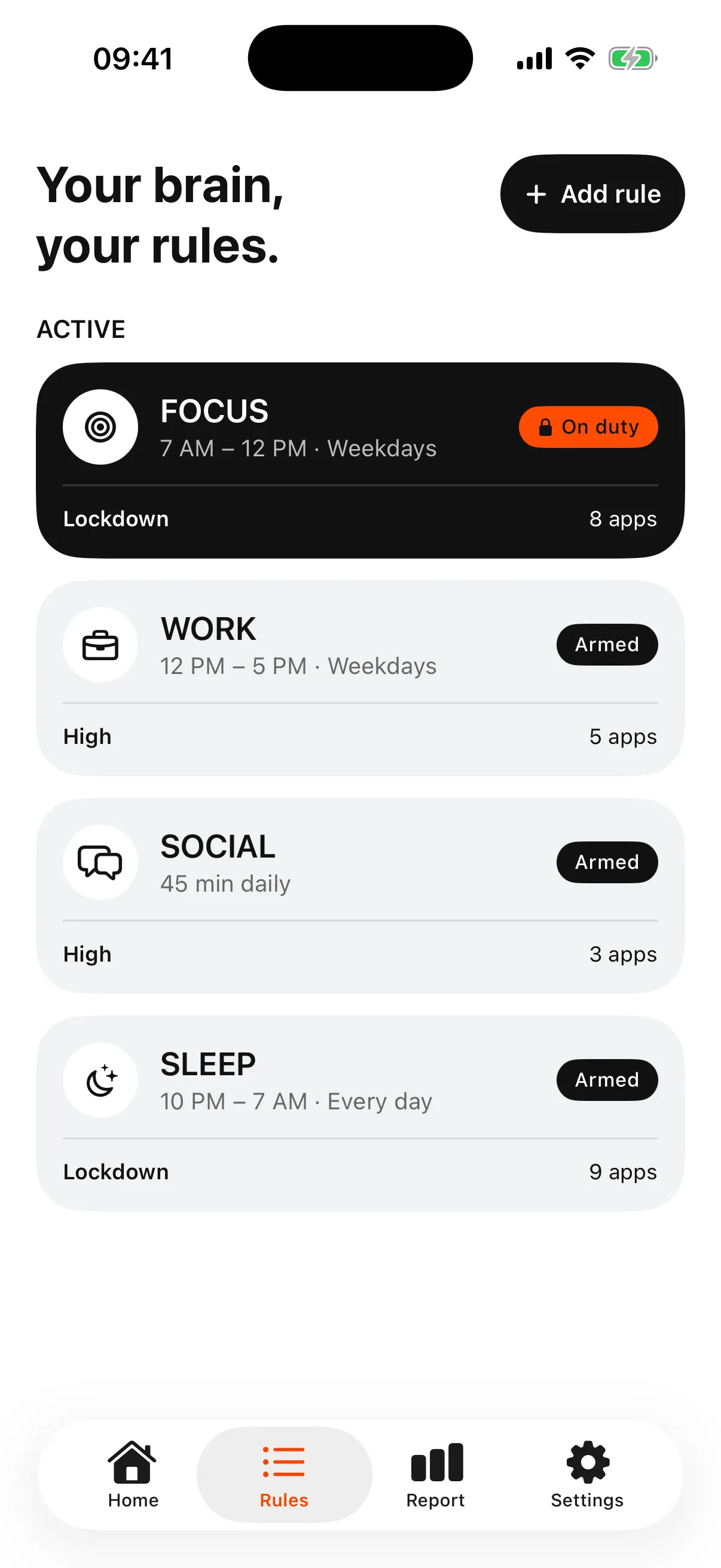
Bouncer blocks selected apps during a scheduled window or after a daily limit. A blocked app shows a shield with no unblock button; access goes through Bouncer. Normal adds a short variable wait. High makes each successful unblock more expensive: a longer wait and a shorter session. Lockdown keeps apps blocked until the scheduled window ends, with one local Emergency Pass that returns seven days after use. Editing an active Normal or High Rule also requires a wait. Bouncer is paid: a Monthly subscription with a seven-day free trial for eligible customers, or a one-time Lifetime purchase. It blocks apps, not individual websites. More detail: Normal, High and Lockdown.
Opal
Opal describes itself as a screen time control app that combines app limits, app blockers, schedules for work hours and sleep, real-time data, leaderboards and rewards. It is free to download from the App Store; check the listing for in-app purchases. See also Bouncer or Opal.
one sec
one sec describes its approach as delaying access to distracting apps instead of blocking them completely. It can also end a session after a set time, which it calls Re-Intervention. According to its listing, using it with one app is free, and more apps need one sec pro.
ScreenZen
ScreenZen lists several methods: a delay before an app opens that can grow each time, short check-ins, app goals with optional blocking, strict blocks for time ranges or after a number of opens, and locks on its own settings. It is free to download from the App Store.
Clearspace
Clearspace describes app blocking and limits, schedules, a pause before opening an app, challenges, and accountability partners who help you keep your goals. It is free to download; check the listing for in-app purchases.
Brick (physical device)
Brick pairs an app with a small physical device. You tap your iPhone on the Brick to block your chosen apps and tap again to unblock, so the device must be nearby. Brick lists five emergency unbricks and says it has no subscription or monthly fee; you buy the device.
Which approach fits you
If a reminder is enough, start with Screen Time. If you open apps on autopilot and a pause is enough to stop you, a delay app fits. If you want a physical barrier, Brick is built for that. If you want different strictness for different moments, such as a short wait during the day and no access at night, Bouncer’s Levels are built for that. Features and prices change: check each App Store listing before you choose.
Frequently asked questions
Is there a free app blocker for iPhone?
Apple Screen Time is free and built in. Several app blockers are free to download with paid features; check each App Store listing. Bouncer is paid, with a free trial on the Monthly plan for eligible customers.
What is the strictest way to block apps on iPhone?
Look for a mode that removes temporary access during a scheduled window and cannot be edited while active, such as Bouncer’s Lockdown, or a physical unlock such as Brick. No app can promise that every workaround is impossible.
Do iPhone app blockers need a jailbreak?
No. They use Apple’s Screen Time framework after you give Screen Time authorization.
Who wrote this comparison?
Bouncer wrote this guide. Information about other apps comes from each app’s own App Store description, checked on September 24, 2026.
Sources
- Apple: Set schedules with Screen Time on iPhone (iOS 26) ↗
- App Store: Opal ↗
- App Store: one sec ↗
- App Store: ScreenZen ↗
- App Store: Clearspace ↗
- App Store: Brick ↗
Sources checked on 24 September 2026. External features and offers can change.
A boundary you choose.
Start with a context you want to protect on your iPhone.